How to pay Road Tax in Cyprus
Road Tax is a tax that must be paid in order to use a car on the roads of Cyprus.
You can pay for it online via the Road Transport Department’s official website.
Link to renew your Road Tax – proceed to pay your Road Tax
Link to renew your Road Tax – proceed to pay your Road Tax
What you’ll need
To make a payment, you will need:
- vehicle registration number;
- the last three digits of the owner’s ID or ARC;
- bank card.
The last three digits are taken from section C.9 of the vehicle’s log book.
You do not need to enter the Log Book number itself.
Step-by-step guide
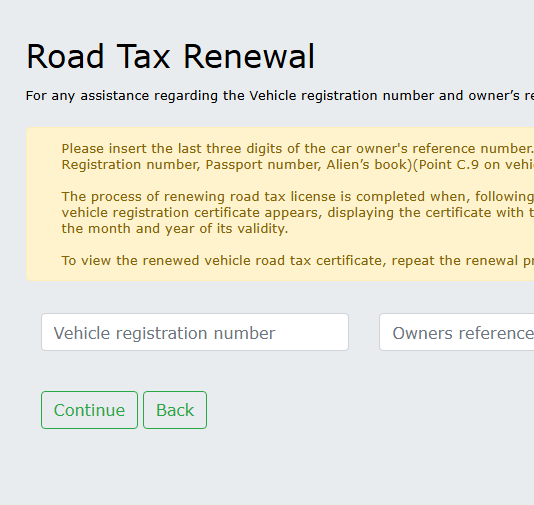
1. Open web-site Road Tax Renewal
Go to the Road Transport Department’s official website and select:
Road Tax Renewal
You do not need to register on the website.
2. Enter the vehicle registration number
Please enter the vehicle registration number, for example:
ABC123
3. Enter the last three digits of your ID or ARC
Open the Log Book and look for section C.9.
Please enter the last three digits of the number given in this section.
For example, if it states:
123456955
You need to enter:
955
If the vehicle is registered to a company, use the last three digits of the company number given in C.9.
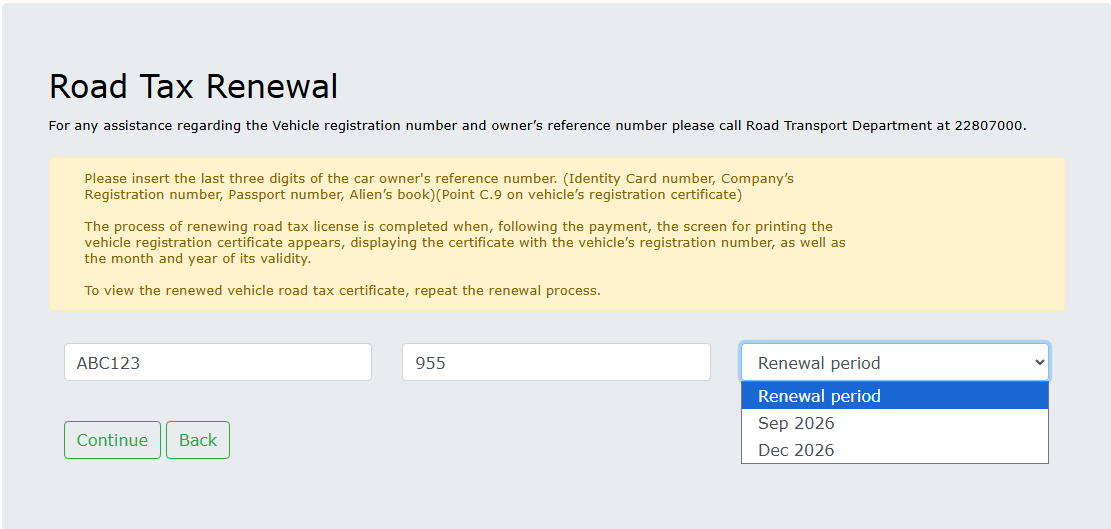
4. Check the details
The system will display information about the vehicle, the renewal period and the amount of Road Tax.
5. Pay the tax
Enter your bank card details and confirm the payment.
Once you have made the payment, please keep the receipt or take a screenshot of the confirmation.
If the system does not accept the data
Please check:
- the validity of the vehicle registration number;
- the last three digits from section C.9;
- valid insurance cover;
- a valid MOT certificate
In brief
To pay Road Tax, you only need:
- vehicle registration number;
- the last three digits of the ID, ARC or company number from section C.9 of the Log Book;
- bank card.
You do not need to enter the Log Book number.
